 ClickNote
ClickNote: explain any text you highlight on a webpage or PDF
ClickNote helps you understand complex content as you read. Highlight any text on a webpage or in a PDF and get a context-aware explanation right where you are, then select inside the answer to go deeper.
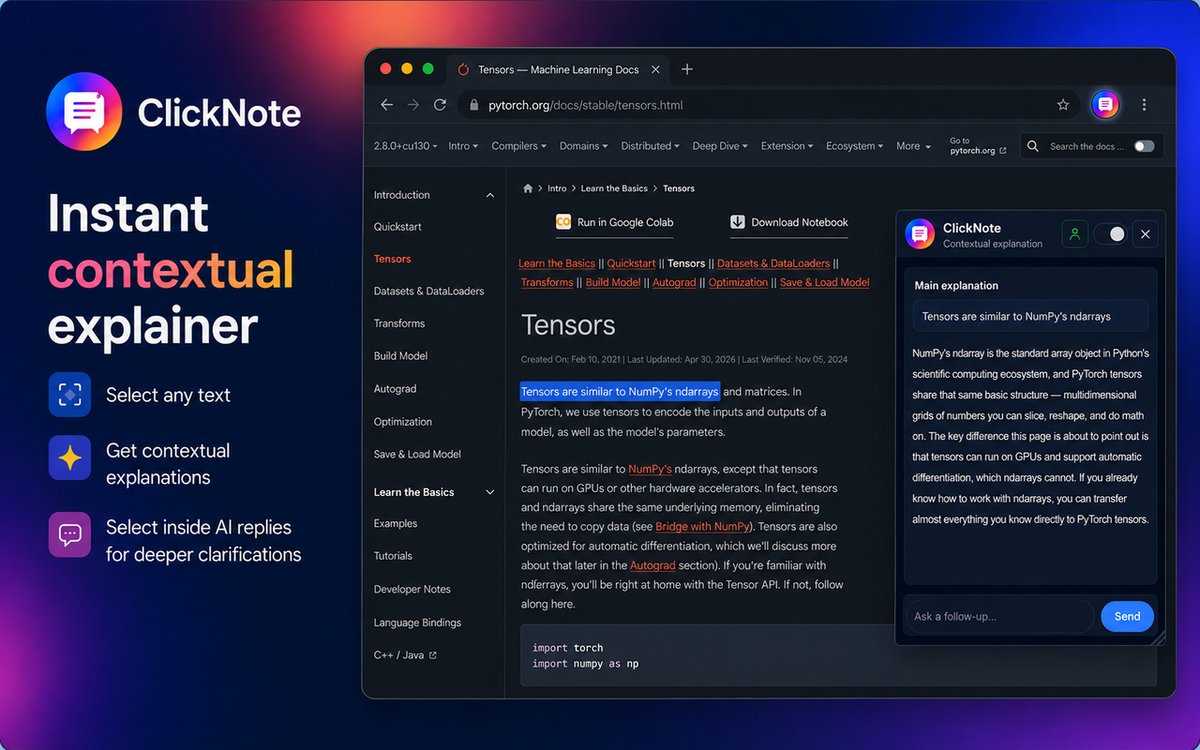
- What it is
- A Chrome extension that explains selected text on webpages and in PDFs
- Context used
- The section heading, nearby paragraphs, and nearby code, tables or lists
- Price
- Free to use up to a limit. ClickNote Pro is $11 per month for 5,000 explanations per 30 days.
- Privacy
- Sends only your selection and nearby context, only when you ask. PDFs are never uploaded.
What is ClickNote?
ClickNote is a reading assistant that lives in your browser. It explains words, sentences and passages you do not understand, without making you leave the page or copy text into a chatbot.
A dictionary gives the general meaning of a word. ClickNote explains what the text means in this document, because it reads the section you are in and the paragraphs around your selection before it answers. A term in a machine learning paper is explained the way that paper uses it. A function name in documentation is explained in terms of the code around it.
What does a ClickNote explanation look like?
Here is an example. A reader is going through a machine learning paper and highlights one sentence they do not follow.
Highlighted in the paper
We apply layer normalization to the input of each sub-layer and add a residual connection around it.
ClickNote explains
In this paper's model, each block (attention or feed-forward) first rescales its input so the numbers stay in a stable range. That is the layer normalization. The block's output is then added back onto its original input. That shortcut is the residual connection, and it helps very deep models train because information can skip past a block if the block is not helping yet.
The reader then highlights "residual connection" inside the answer
A residual connection adds a layer's input directly to its output, so the layer only has to learn a correction rather than a whole new result. In this paper it is what lets many stacked blocks train reliably.
The answer refers to this paper's model rather than giving a textbook definition, and the second explanation builds on the first.
How do I get an explanation of highlighted text in Chrome?
Install ClickNote, then highlight the text you want explained. The steps:
- Add ClickNote to Chrome from the Chrome Web Store.
- Highlight text on any webpage or in a PDF opened in Chrome. A word, a sentence or a whole paragraph all work.
- Read the explanation that appears next to your selection within a few seconds. Answers stream in and stay short.
- Go deeper if you need to. Select any phrase inside the answer to get an explanation of that part, or type a follow-up question.
Each deeper explanation stays linked to the one before it, so you can jump back to any earlier answer. Only one answer is open at a time, so the panel stays small no matter how far you go.
Can ClickNote explain PDFs?
Yes. ClickNote opens PDFs in its own viewer inside Chrome, so research papers, manuals, textbooks and reports work the same way as a webpage. Select a passage and ClickNote explains it using the surrounding lines, paragraph and page as context.
The ClickNote PDF viewer includes:
- Smooth scrolling through long documents
- Search, zoom, fit to width, rotate and page jump
- Download, and a one-click switch back to Chrome's built-in PDF viewer
How do I get explanations inside a PDF in Chrome?
- Open the PDF in Chrome, from a link or a website. ClickNote shows it in its own viewer.
- If Chrome shows its standard PDF viewer instead, choose Open this PDF in ClickNote.
- Highlight a passage in the PDF. The explanation appears beside it, just like on a webpage.
The PDF is rendered entirely on your computer and is never uploaded. PDF support needs Chrome 151 or newer.
What can you use ClickNote for?
Understanding research papers
Select an unfamiliar method, equation or term in a paper and ClickNote explains it in the context of that paper. It works on papers in the browser and on PDFs, so you can read arXiv papers and journal PDFs without switching to a separate tool.
Reading technical documentation
Select a parameter, error message or code snippet in documentation and ClickNote explains it using the nearby code and text. This helps when learning a new library, API or framework.
Studying textbooks and course material
Students can select a confusing sentence in a textbook PDF, lecture notes or an online course page, then keep asking follow-ups until the idea makes sense.
Reading dense articles and reports
Select jargon in news analysis, policy documents, financial reports or long-form articles to get a plain explanation without losing your place.
How does ClickNote compare with other ways to understand difficult text?
ClickNote is built for explaining one specific passage while you keep reading. Other tools are built for different jobs.
| Approach | What you do | Context the answer uses |
|---|---|---|
| ClickNote | Highlight text on the page or in a PDF | Your selection plus its section, nearby paragraphs, and nearby code, tables or lists. The answer appears beside the text. |
| Copying text into ChatGPT or another chatbot | Copy, switch tabs, paste and explain where it came from | Only what you paste and describe. The answer is in another tab. |
| AI sidebar extensions | Open a sidebar and ask about the page | Usually the whole page, which suits summaries more than explaining one passage. |
| Dictionary and definition extensions | Double-click a word | The word alone. You get its general meaning, not what it means in this document. |
ClickNote is a good fit when you understand most of what you are reading and get stuck on particular terms, sentences or steps.
What features does ClickNote have?
- Page-aware explanations that use the section, nearby paragraphs, and any nearby code, table or list.
- Nested explanations: select any part of an answer to go deeper.
- Follow-up questions typed directly in the panel.
- Built-in PDF viewer with search, zoom, fit to width, rotate and download.
- Quick pause: press the left and right mouse buttons together to pause or resume.
- Stays out of your way: selections in text fields, password boxes and payment forms are ignored.
- Movable panel that finds empty space beside your text and can be dragged or resized.
- Day and Night themes.
- Sign in with Google, GitHub or email.
How much does ClickNote cost?
ClickNote is free to use up to a usage limit. For more, ClickNote Pro costs $11 per month for 5,000 explanations per 30-day period.
| Plan | Price | Explanations |
|---|---|---|
| Free | $0 | Up to a usage limit |
| Pro | $11 / month | 5,000 per 30-day period |
Is ClickNote private?
When automatic explanations are enabled, selecting text sends the selection and limited nearby context, including the page title and URL, to ClickNote's backend and an AI service. Page text is not sent simply because you visit a page. Preferences and limited reading progress are stored locally in your browser.
- PDFs are rendered on your computer and never uploaded.
- Selected text, questions, context, and answers are not saved in ClickNote's application database. AI services have their own processing and retention policies.
- ClickNote does not sell user data.
Read the full ClickNote privacy policy.
Frequently asked questions
Is there a Chrome extension that explains highlighted text?
Yes. ClickNote is a Chrome extension that explains any text you highlight on a webpage or in a PDF. The explanation appears beside the text and uses the surrounding page as context. You can ask follow-up questions or highlight part of the answer to go deeper.
Is ClickNote free?
Yes, ClickNote is free to use up to a usage limit. For more explanations, ClickNote Pro costs $11 per month for 5,000 explanations per 30-day period.
How is ClickNote different from asking ChatGPT or another chatbot?
With a chatbot you copy text into another tab and describe where it came from. ClickNote works on the page: you select the text and it automatically includes the section, nearby paragraphs, and any code, table or list around it. The answer appears beside the text, and you can select any phrase in the answer to go deeper.
Can ClickNote explain text in PDFs?
Yes. ClickNote opens PDFs in its own viewer in Chrome, where you can select a passage and get the same context-aware explanation as on a webpage. The viewer includes search, zoom, fit to width, rotate, page jump and download. PDF support needs Chrome 151 or newer.
Does ClickNote upload my PDFs or the pages I read?
Complete PDFs are rendered locally and never uploaded. When an explanation is requested, ClickNote sends selected text, limited nearby context, and page metadata to its backend and an AI service. Selecting text starts a request automatically while enabled. Explanation content is not saved in ClickNote's application database; AI services have their own processing and retention policies.
How do I pause ClickNote?
Press the left and right mouse buttons together to pause ClickNote, and press them together again to resume. You can also turn selections on or off from the ClickNote toolbar icon.
Will ClickNote pop up when I select text in a form or password field?
No. ClickNote ignores selections in text fields, password boxes, payment and banking fields, and other editable areas. It only responds to selections in content you are reading.
Does ClickNote need an internet connection?
Yes. Explanations are generated by an AI model on ClickNote's server, so an internet connection is needed. Viewing a PDF in ClickNote's viewer works locally.